
Protection of information (video data) obtained from IP video surveillance cameras is currently a key issue in our realities. Years of war with the aggressor country have shown the weaknesses of some camera manufacturers and the urgent need to provide additional protection for security systems. Very often, our enemy, using cyberattacks on IP video surveillance systems, was able to track the results of missile attacks and the movement of our military equipment in individual cities.

So how can you protect your video surveillance system from future cyberthreats? In this article, I will try to talk about the simplest steps you need to take to protect your home or private (corporate) IP video surveillance system.
Attack and counterattack
IP video cameras can be attributed to the devices of the “Internet of Things” and therefore should be rightly considered very vulnerable to cyber threats. Today in our realities, the protection of video data is one of the priority tasks. Manufacturers of IP video surveillance cameras and software, which are present on the Ukrainian market, have their own developments and means of combating cyber threats, which will be discussed further in our article.
SITON GROUP LLC has certified specialists in the field of IP video surveillance systems and cybersecurityThe company's portfolio includes solutions from such world-renowned software and IP video camera manufacturers as Axis and Milestone Systems, as well as cybersecurity solutions from Splunk, Cisco, Paloalto, RSA, CiberArk, and FUDO Security.
Protection against cyber threats in IP video surveillance systems should be a comprehensive solution that combines both products from the world's leading manufacturers of IP video surveillance equipment and software, and Cybersecurity solutions from leaders in the field, as well as specialists from the customer's system operation service (Fig. 1)
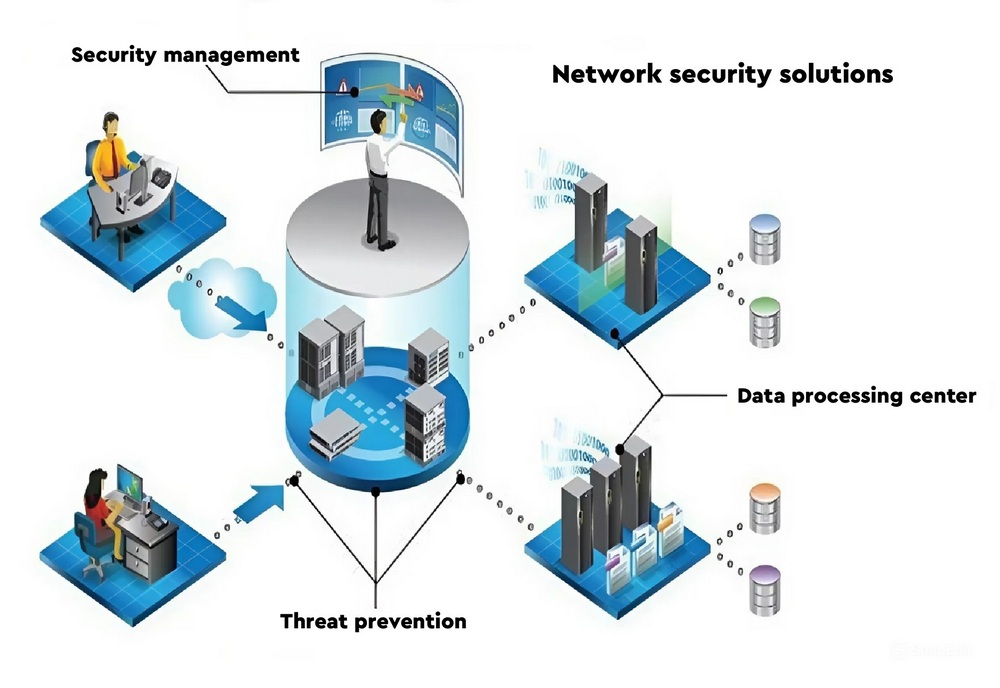
Fig. 1. Protection against cyber threats — a comprehensive solution
The main steps that need to be taken to prevent cyber threats and hacker attacks, primarily on the Customer's side, should be carried out by specialists who are directly involved in the operation of the IP video surveillance system. These steps are based on the recommendations of the world's leading manufacturers of equipment and software.
- At the first stage, the attacker (hacker) collects information (intelligence) regarding the IP video surveillance system, searches for weak and vulnerable spots. What countermeasures can be applied at this stage to counteract the attacker? I will try not to go into deep technical details and answer this question as simply as possible, namely: first of all, the customer needs to make sure that his video surveillance system is reliably protected and invisible to port scanning. This can be achieved using firewalls and intrusion detection systems from the leaders in the field: Splunk, Cisco, Paloalto, RSA, CiberArk, FUDO Security. (Fig. 2) For more detailed advice, you can contact the specialists of Seeton.
- The next logical step is for the attacker to create a malicious payload on the customer’s IT system and regular users. Here, the attack will primarily target mail servers, active network equipment, and possibly USB ports on any of the customer’s devices. Countermeasures include reliable email protection to prevent phishing attacks, frequent system updates and patches to address known vulnerabilities, and the implementation of robust control over USB ports and other physical interfaces.
- The third stage is when an attacker compromises the customer’s existing security system. The customer can protect themselves from these actions by installing advanced endpoint protection solutions that use machine learning to detect and block new threats.
- The fourth stage of an attacker’s intrusion is the installation of a so-called “backdoor” into a compromised system. To detect such activity, it is necessary to constantly monitor and control network activity for any unusual patterns of data sending, including to known malicious IP addresses.
- The attacker's actions on the intended targets are actually the last stage of causing harm to the customer and their IP video surveillance system. Actions to prevent the threat - regular system audits and data backups - can limit the damage and speed up recovery in the event of a successful attack by the attacker.
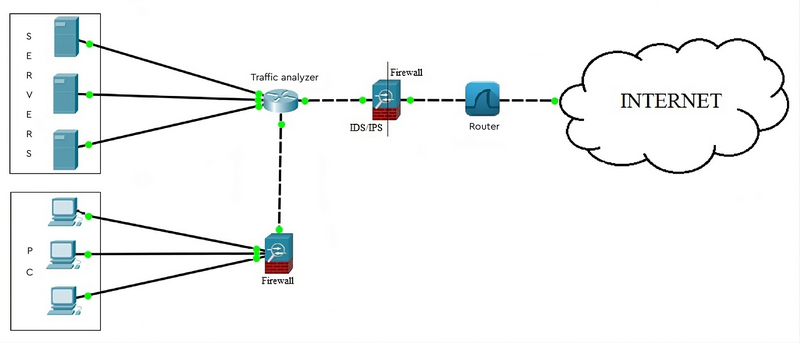
Fig. 2. It is important to protect the system with cybersecurity solutions from industry leaders
Let's protect cameras and applications
Security of IP cameras of video surveillance systems is very important, since the cameras themselves can serve as a gateway for intruders to penetrate. In our case, there is a significant drawback directly related to the transmission of unencrypted data, which can be intercepted and viewed by intruders. This vulnerability must be eliminated to reduce the risks associated with it. In addition, mobile applications on phones that have programs from manufacturers of IP video cameras of video surveillance systems installed, in particular remote monitoring tools, can also be dangerous; due to the lack of reliable protection, they can serve as easy entry points for intruders,
To prevent unauthorized access, it is important to implement strong authentication protocols. Relying on default passwords leaves mobile applications that perform monitoring functions for IP video surveillance systems with critical vulnerabilities; these weaknesses should be avoided. To ensure reliable protection, two-factor authentication should be used: the first “factor” is a regular, secure password, standard for any account, in accordance with corporate security policies. The second “factor” is a confirmation code received from a separate application on a mobile device or computer.
To mitigate the effects of an attack, it is necessary to protect software solutions at several levels – to create redundant security controls, so to speak. This way, if an attacker manages to compromise one part of the solution, the impact on the customer’s IP video surveillance system will be limited to that specific segment, preventing unauthorized access to other areas. This defense-in-depth strategy serves two purposes. First, it facilitates the audit process, allowing for a thorough investigation to identify the attacker’s actions, when they occurred, and the responses to them. Second, it allows for intrusion and breach event analysis, helping administrators analyze the details of the attack, understand the root causes, and develop preventive measures against similar attacks in the future.
How to secure a video surveillance system
Here are some simple recommendations for ensuring stable operation of IP video surveillance system cameras from the software manufacturer Milestone Systems, the manufacturer of the actual IP cameras AXIS, and the specialists of Seeton:
- Change passwords on your system periodically. Even if it hasn't been hacked yet, you should occasionally change the data on your equipment. Security system manufacturers recommend doing this at least once every two weeks. This is a guarantee that no one else will be able to access your data.
- Change HTTP and TCP/IP ports. You need to change the default ports because the attacker often scans them. You can set any port in the range from 1025 to 65535.
- Activate HTTPS/SSL. Configure the SSL protocol, this will allow you to encrypt communication between devices.
- Use UPnP. This feature allows you to wake up non-standard virtual ports, which minimizes the possibility of hacking.
- Disable SNMP. If you are not using this feature, you should disable it for increased security.
- Use a PoE NVR. When connecting surveillance cameras, use a PoE NVR, this technology can reliably protect against external factors.
- Block TELNET. You need to block TELNET on your router, as this is the protocol used by viruses and attackers.
- Set up an IP filter. Keep the addresses in the whitelist, which will exclude any others.
- Change the standard ONVIF passwords. Some cameras have a complex password for logging in, but a simple one for ONVIF. When using this protocol, you need to change the password for the device cabinet using the ONVIF Device Manager software.
- Wake up the ports. It is necessary to use the ports that are needed to ensure the intended purpose and perform the specific tasks.
- SMARTPSS automatic login. If you have this feature enabled, it must be disabled. If an attacker can gain access to your PC, they can easily compromise your video surveillance system.
By following these simple recommendations, you will be able to ensure the stable and reliable functioning of your IP video surveillance system.
If you need more detailed advice, you can contact the specialists of "SEETON GROUP" LLC. Sales@seeton.pro,
https://www.facebook.com/SeetonGroup, https://www.linkedin.com/company/seeton